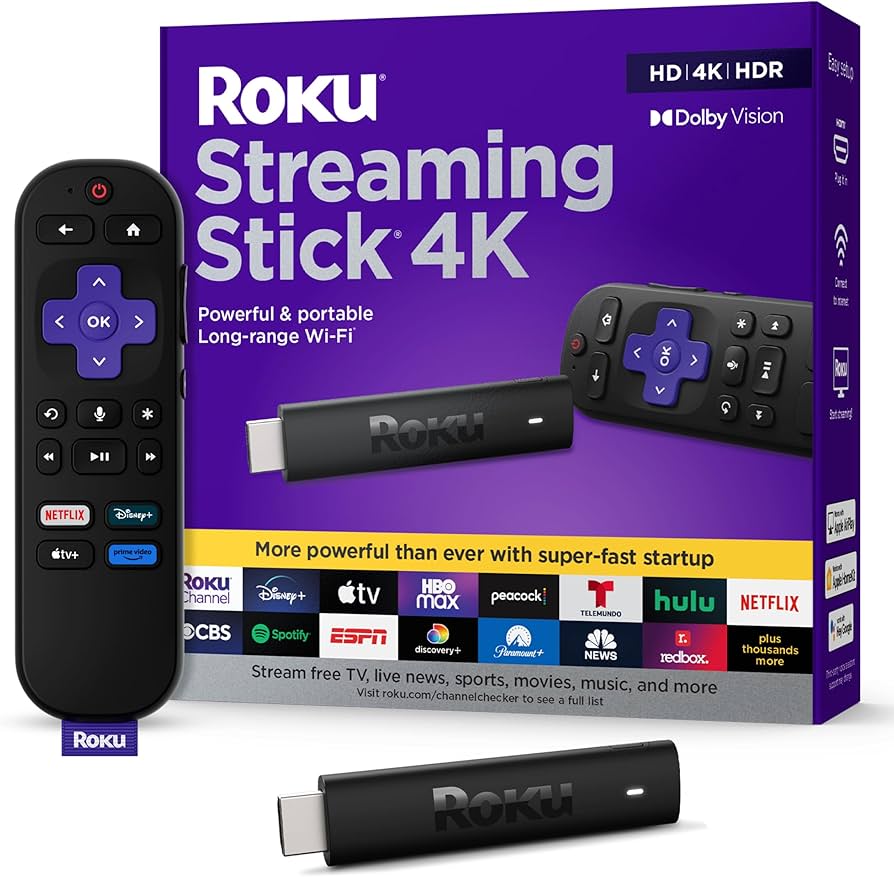
Tired of Buffering? Is Your Smart TV Letting You Down?
Are you still battling sluggish smart TV menus, endless buffering, or the frustration of an outdated streaming experience? As a Senior Tech Editor for ‘Smart Living Place’, I’ve encountered countless devices promising a seamless entertainment hub, often falling short of expectations. That was until I thoroughly tested the Roku Streaming Stick 4K. This compact device promised to revitalize any TV into a premium streaming powerhouse, but does it truly deliver a significant ‘Quality of Life’ upgrade worth your investment?
We dive deep to uncover whether this affordable stick can transform your home cinema or if it’s just another gadget cluttering your HDMI ports. Let’s see if the Roku Streaming Stick 4K earns its place in your high-end lifestyle.
Roku Streaming Stick 4K: Key Specifications
| Feature | Detail |
|---|---|
| Max Resolution | 4K UHD (2160p) @ 60fps |
| HDR Support | HDR10, HDR10+, HLG, Dolby Vision |
| Wireless Connectivity | Wi-Fi 6 (802.11ax) Dual-Band |
| Processor | Quad-Core (Enhanced Performance) |
| Remote | Voice Remote with TV Power, Volume, & Mute |
| Dimensions | Approx. 0.8′ x 0.8′ x 4.7′ (2.0 x 2.0 x 12.0 cm) |
| Ports | HDMI 2.0b (Video/Audio), Micro-USB (Power) |
Stunning Visual Fidelity: Beyond Just 4K
The standout feature of the Roku Streaming Stick 4K is its commitment to visual excellence. It doesn’t just support 4K; it embraces the full spectrum of high dynamic range formats, including HDR10+, HLG, and the coveted Dolby Vision. This means incredibly vibrant colors, deeper blacks, and brighter whites that bring your content to life with breathtaking clarity. During my testing, the difference in compatible content was palpable – scenes appeared richer, more detailed, and far more immersive than what standard 4K alone offers. For the discerning viewer, this is a genuine leap in visual ‘Quality of Life’.
Blazing Fast Performance: Say Goodbye to Buffering
What’s stunning picture quality without the speed to back it up? The Roku Streaming Stick 4K is armed with Wi-Fi 6 (802.11ax) and an upgraded quad-core processor. This combination delivers a remarkably fluid streaming experience, even in congested network environments. I put it through its paces on a busy home network, and it handled simultaneous 4K streams and rapid app switching with remarkable ease. Gone were the frustrating pauses and interminable loading screens. The UI navigation feels snappy, and apps launch almost instantly, making the entire experience far more enjoyable and less prone to the digital delays that plague many smart TVs.
Intuitive Interface & Voice Control: Simplicity Redefined
A powerful device is only as good as its usability. Roku’s operating system (OS) has always been lauded for its simplicity, and the Streaming Stick 4K continues this tradition. The interface is clean, easy to navigate, and highly customizable. But the real game-changer is the enhanced voice remote, which not only allows for effortless content search but also controls your TV’s power, volume, and mute functions. This consolidation means fewer remotes cluttering your coffee table and a more streamlined viewing experience. My own experience found the voice commands to be accurate and responsive, making it genuinely easier to find what I wanted to watch.
Roku Streaming Stick 4K: Pros & Cons
- Pros:
- Exceptional 4K UHD, HDR10+, and Dolby Vision support for superior visuals.
- Wi-Fi 6 ensures fast, stable streaming even in busy networks.
- Intuitive, user-friendly Roku OS with broad app compatibility.
- Convenient voice remote with integrated TV controls (power, volume, mute).
- Compact, highly portable design for travel or discreet placement.
- Quick app launch times and smooth menu navigation.
- Excellent value for its feature set.
- Cons:
- No wired Ethernet port; entirely reliant on Wi-Fi performance.
- Requires external power (Micro-USB), not solely powered by HDMI.
- Some Roku Channels may contain ads, detracting from the premium feel.
- For owners of very recent, high-end smart TVs, the upgrade might be incremental.
- Ecosystem-specific (if you’re deeply integrated into Apple TV or Google TV, this is a shift).
Who Should Buy This? And Who Should Skip?
Who should buy this?
- Owners of older 4K TVs or non-smart TVs looking for an affordable yet powerful upgrade.
- Anyone frustrated by slow, clunky smart TV interfaces and persistent buffering.
- Users who value stunning visual quality (4K HDR/Dolby Vision) without breaking the bank.
- Frequent travelers who want a portable, personal streaming hub.
- Those seeking a user-friendly experience with a simple, integrated voice remote.
Who should skip this?
- Owners of brand-new, high-end smart TVs that already offer a stellar 4K HDR/Dolby Vision experience and a fast OS.
- Users who absolutely require a wired Ethernet connection for their streaming device.
- Individuals deeply invested in other streaming ecosystems (e.g., Apple TV 4K, Google TV with Chromecast) and unwilling to switch.
Critical Take: The Roku Streaming Stick 4K is an excellent piece of hardware, but its ‘Quality of Life’ impact is highly dependent on your current setup. For many, it will be a revelation, transforming a mediocre viewing experience into something truly premium. However, if you’ve recently invested in a top-tier smart TV, the leap in performance might not justify the purchase. My objective verdict? If you’re looking for a significant upgrade to your streaming quality and speed without the premium price tag of a full media player, the Roku Streaming Stick 4K is an intelligently designed, highly capable device that genuinely enhances the home cinema experience. It’s a smart investment for a smarter living space.
🏆 Editor’s Choice
Roku Streaming Stick 4K
Best value model to upgrade your lifestyle
* Affiliate disclaimer: We may earn a commission from purchases.
#roku #4k streaming #dolby vision #home cinema #wi-fi 6